Isn't there just one Claude? Actually, there are three: Chat, Cowork, and Code. The chat window you'd recognize from ChatGPT or Gemini in Google search is just one of Anthropic's three Claude products right now — and for a lot of real work, it's not the best option.
💡 Tip
It's easiest to follow along if you've downloaded the Claude desktop app (requires a Pro plan or higher).
What Claude actually is
Claude is an AI assistant made by the company Anthropic. If you currently use OpenAI's ChatGPT, it's probably easiest to think of Claude as the equivalent. Claude relies on underlying LLMs (large language models) — Sonnet 4.6, Opus 4.8, and others — that power its ability to "think." Within Claude, there are three different interfaces: Chat, Cowork, and Code. Each provides different capabilities and reach, and each is useful for different types of tasks and work.
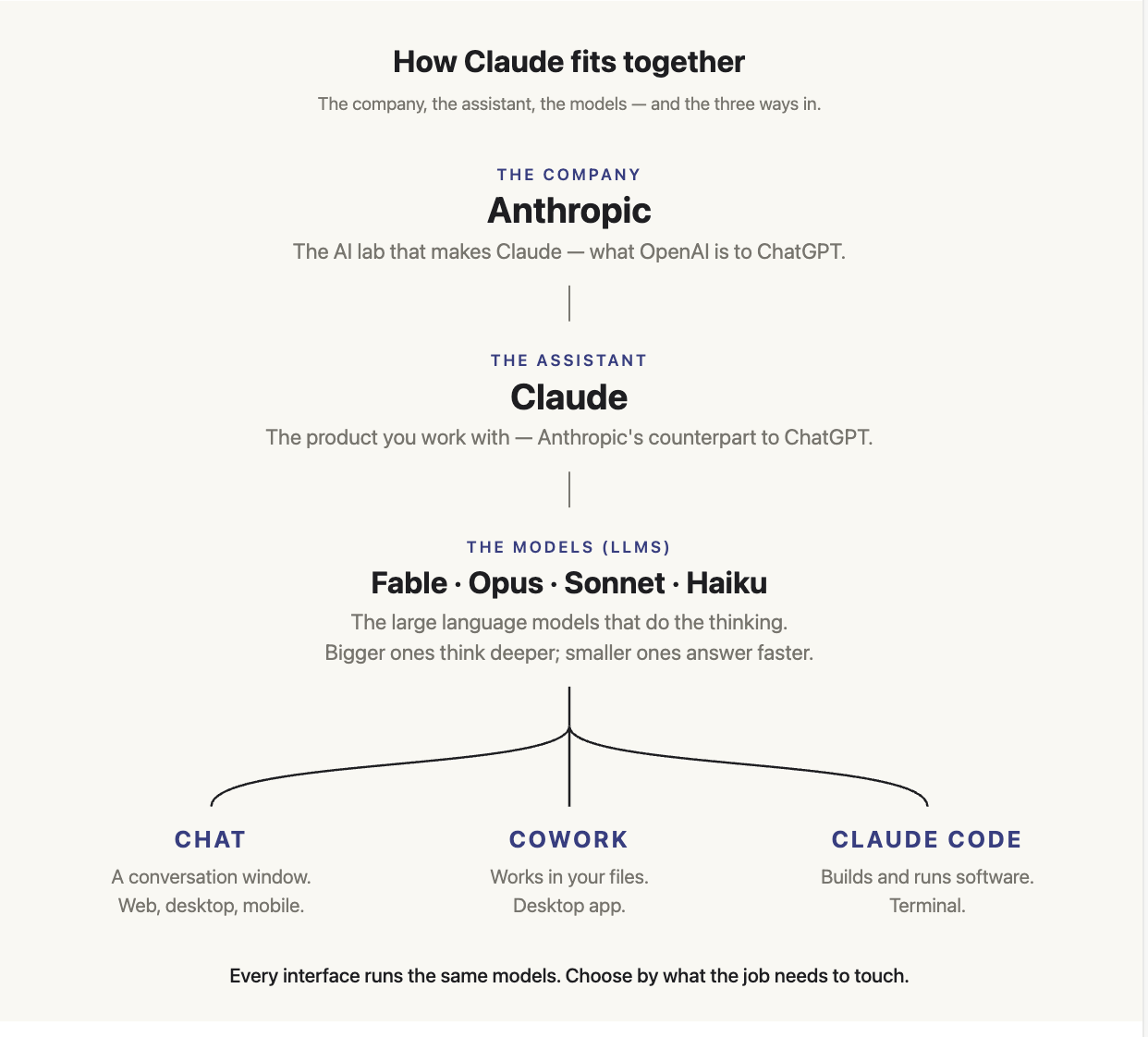
The three interfaces — and when to use each
Each of the three interfaces has different use cases and different strengths, outlined below.
Spoiler alert: unless you're comfortable working in a terminal, Claude Code is probably not for you.
Claude Chat is traditional AI chat. You can use it on the web, on mobile, or in the Chat tab in the Claude desktop app. It reads what you paste or upload and writes back. It's fast, it has a free tier, and it uses the least of your usage limits. Its main limitation is that it can't access or save any files on your computer — its scope is limited to the information you actively give it in the chat. You're responsible for uploading or sharing any material you want Claude to use, rather than asking Claude to pull it from your computer.
Claude Code is designed for technical people — software engineers who build things and generally work in a terminal. It's a command-line tool that runs in the desktop app or in your terminal, built for reading and editing codebases, running commands, git and GitHub workflows, debugging, and writing tests. It's targeted at developers, but non-developers can also use it to build tools and automations from plain-English instructions. You can use Claude Code for everything you'd use Cowork for, but there's really no reason to unless you're an engineer. If you're not comfortable in a terminal, or you don't know what a markdown file is, it's probably not the easiest choice for you — unless you want to invest in a steeper learning curve.
Claude Cowork is, in my opinion, the most powerful option for any non-coder who wants Claude to provide serious leverage in their job. It lives in a tab in the Claude desktop app. What makes Cowork different is that it can access files on your computer — it can read, edit, and create files. I like to think of it as an intern who can take independent actions. You can hand work off to it and come back to a completed task. You connect a folder, describe the outcome you want, and Claude plans the work, executes step by step, and saves real files — Excel workbooks with working formulas, formatted Word docs, PowerPoint decks — into that folder. If you connect your apps to Cowork, Claude can open and operate them too.
One misconception about Cowork is that there's no chat in the Cowork tab. That's incorrect. Cowork does have chat — it's just meant to be used within Cowork's broader functionality.
Another misconception is that you can't build anything with Cowork. Also not true. While it's not designed to build anything as in-depth as you could with Claude Code, I easily build webpages and basic app functionality straight from Cowork.
Real use cases for each interface
Still not sure what to use when? See below.
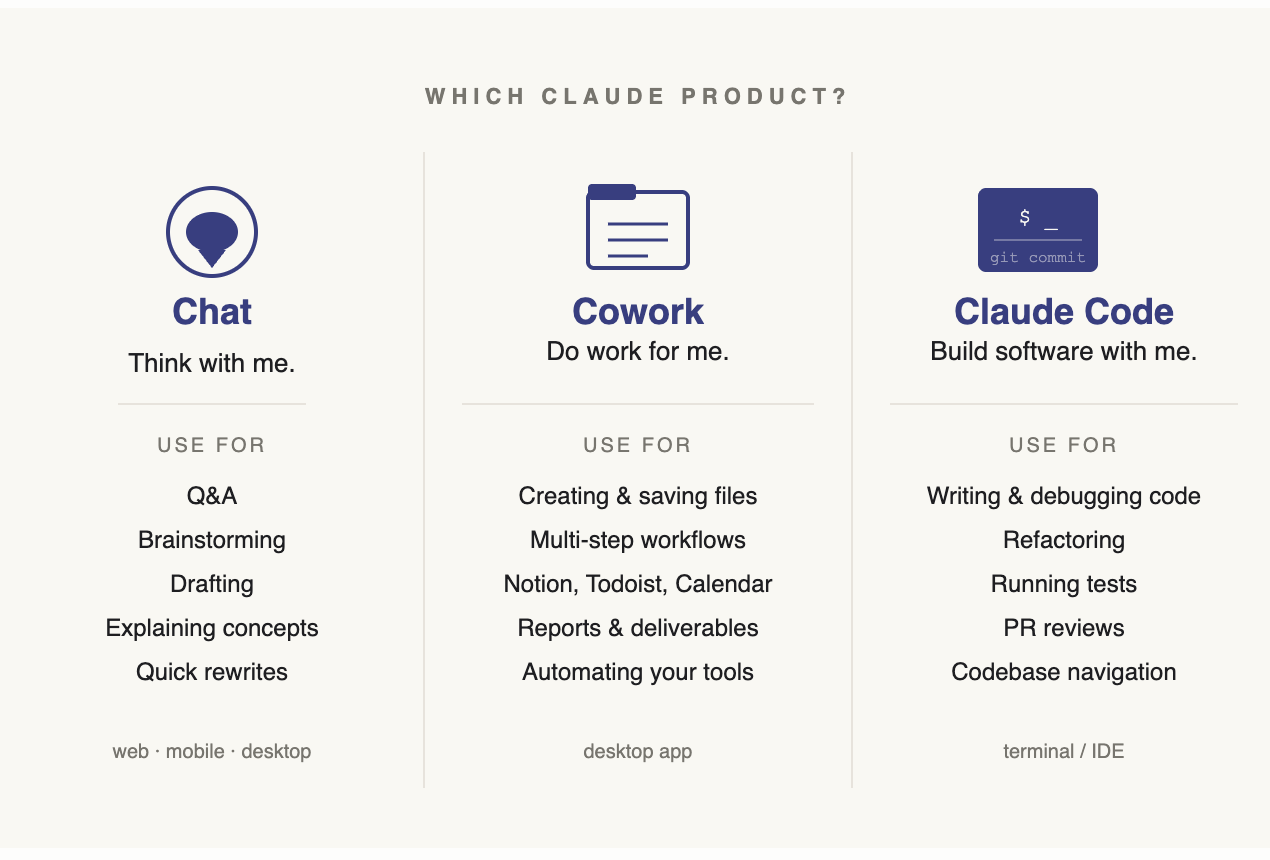
Chat is for thinking, drafting, and answering — anything that's a conversation, not a workflow.
- "What are today's top AI news headlines?"
- "Help me rewrite this email to sound less pushy."
- "Explain how neural networks work."
- "What should I charge for a 3-month consulting engagement?"
- "What are the top-rated hotels in Miami for a family with 2 kids?"
Cowork is for getting work done on your computer — files, tools, multi-step tasks.
- "Draft this blog article and publish it to Notion."
- "Turn these meeting notes into a client-ready report and save it as a Word doc."
- "Add all these action items to my to-do list."
- "Build me a 5–10 slide deck from this research doc."
- "Pull the top-line financials from last week's revenue report."
The tell: if the output lives somewhere — a file, an app, a Notion page — or you need it to connect to your tools, that's Cowork.
Claude Code is for software development — writing, running, and debugging code.
- "Refactor this Python script to handle edge cases."
- "Set up a new FastAPI project with auth."
- "Debug why this test suite is failing."
- "Write a script that pulls data from this API and outputs a CSV."
- "Review this PR before I merge it."
The tell: if the work is in a codebase, a terminal, or git, that's Claude Code.
What you've learned
You now know that "Claude" isn't one product — it's three interfaces, and picking the right one is the difference between fighting the tool and getting real work done. Chat is for thinking, drafting, and answering questions. Cowork is for getting work done on your computer — files, connected apps, and multi-step tasks you can hand off and walk away from. Claude Code is for software development, and unless you work in a terminal, you can skip it.
📋 Try it this week
This week, make a habit of asking where the output lives before you start. If you just need an answer or a draft inside the conversation, that's Chat. If the result has to land in a file, an app, or one of your tools, that's Cowork. Once that question is second nature, you'll stop reaching for the chat window to do work it was never built for.